01
Your panel, your layout.
Pick the instruments you need. Arrange and resize them for your screen, whether you fly a piston single, a turboprop or a jet.
 FlightCockpitBETA
ANDROID + WINDOWS · MSFS 2020
A companion app for Microsoft Flight Simulator 2020: your Android tablet becomes a second screen and instrument panel, while the outside view stays on your main monitor.
Windows bridge. Local network. QR pairing.
BETA
We're inviting pilots to test FlightCockpit before launch, step by step. Apply with a free account: tell us which simulator, aircraft and device you use, and we'll pick testers to match. Want to look around first? Read the beta setup guide.
Not ready to test? Leave your email and we'll send you a single email when FlightCockpit launches.
Loading form…
BUILT AROUND YOUR FLIGHT
Pick the instruments you need. Arrange and resize them for your screen, whether you fly a piston single, a turboprop or a jet.
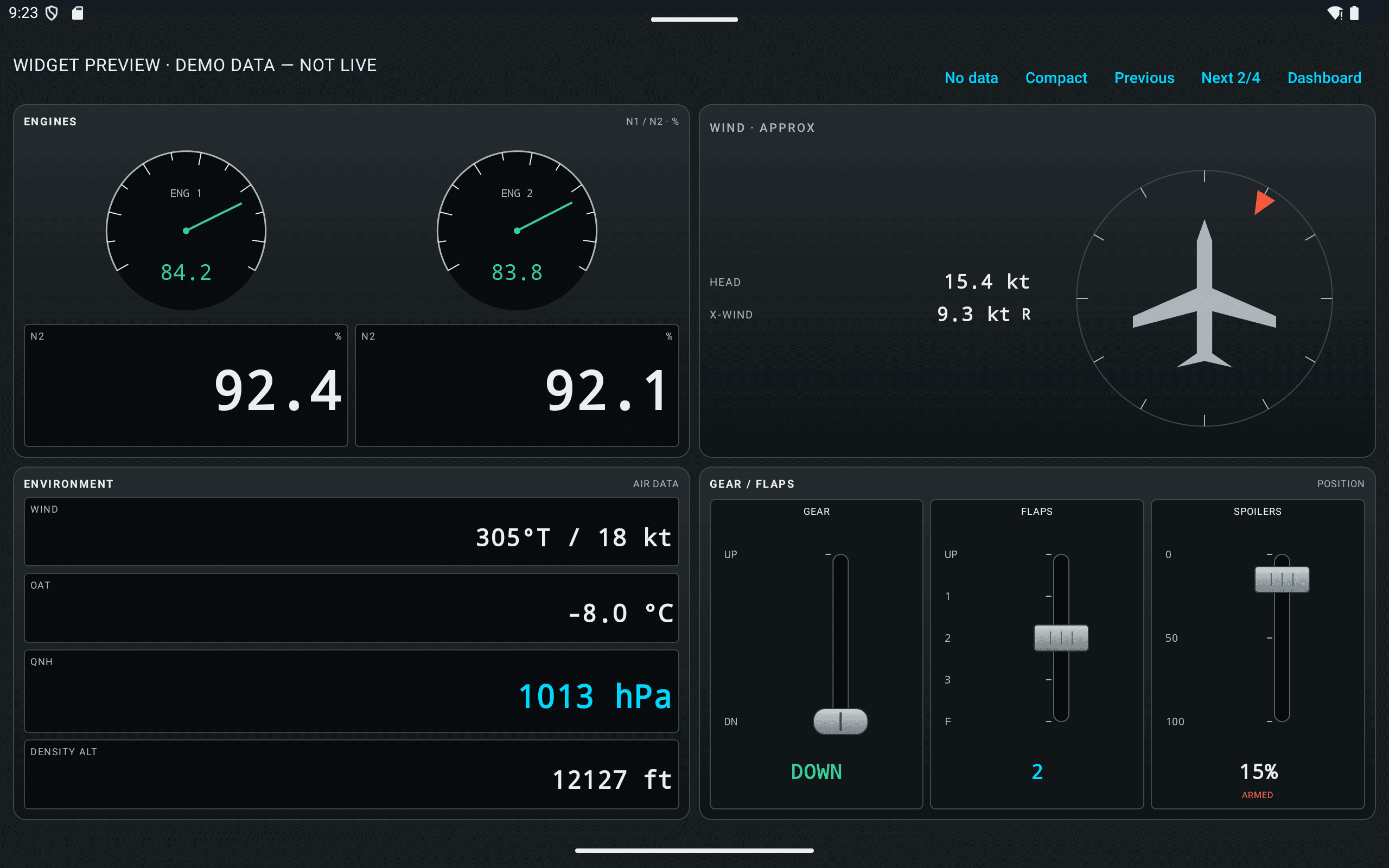
Engine displays adapt to the reported engine type. Unavailable data is marked clearly, instead of being filled with invented readings.
The development preview streams supported simulator pop-out windows for PFD, ND, ECAM and E/WD. Your aircraft supplies the image.
THE INSTRUMENT LIBRARY
From the first climb to the final checklist. Flight data, engine readings, aircraft systems and original simulator displays, all in a dashboard you arrange.
Development preview · September 2026 The latest widgets and pop-out streaming are in development. The downloadable beta may contain an earlier set.
The essentials, always in sight.
IAS, true airspeed and ground speed
Indicated, AGL, radio altitude and vertical speed
Magnetic heading
Coordinates, track and next waypoint
Local and UTC time
Wind, outside temperature, pressure and density altitude
Approximate headwind, tailwind and crosswind
Read the settings without changing your view.
Selected heading, altitude and speed
Reported AP, flight director and guidance states
COM, NAV and transponder
Parameters that fit the engine type.
Piston RPM / manifold pressure, turboprop RPM / torque or turbine N1 / N2
RPM, manifold pressure, CHT and EGT
Propeller RPM; torque and ITT for turboprops
Oil pressure and temperature
Choose the view that suits your cockpit.
Quantity, estimated endurance and range
Per-engine and total consumption
Left and right tank quantities
Two analog tank gauges with reported capacities
A clear view of the systems your aircraft reports.
Gear, flaps, spoilers and parking brake
Battery 1 voltage / current and generator states
Engine-indexed pressure and quantity
Cabin altitude, rate, pressure difference and signs
Landing, taxi, navigation, beacon and strobe
Reported pitot, airframe, windshield and engine states
Stream a supported pop-out window from your PC.
Original primary flight display
Original navigation display
Original system display
Original engine / warning display
TAKE A CLOSER LOOK
Real Android captures with demo values. Swipe, scroll or use the arrows.

IAS, true airspeed and ground speed
Development preview · demo values · availability depends on the aircraft.Indicated, AGL, radio altitude and vertical speed
Development preview · demo values · availability depends on the aircraft.
Magnetic heading
Development preview · demo values · availability depends on the aircraft.
Coordinates, track and next waypoint
Development preview · demo values · availability depends on the aircraft.Local and UTC time
Development preview · demo values · availability depends on the aircraft.
Wind, outside temperature, pressure and density altitude
Development preview · demo values · availability depends on the aircraft.Approximate headwind, tailwind and crosswind
Development preview · demo values · availability depends on the aircraft.Selected heading, altitude and speed
Development preview · demo values · availability depends on the aircraft.Reported AP, flight director and guidance states
Development preview · demo values · availability depends on the aircraft.COM, NAV and transponder
Development preview · demo values · availability depends on the aircraft.Piston RPM / manifold pressure, turboprop RPM / torque or turbine N1 / N2
Development preview · demo values · availability depends on the aircraft.
RPM, manifold pressure, CHT and EGT
Development preview · demo values · availability depends on the aircraft.Propeller RPM; torque and ITT for turboprops
Development preview · demo values · availability depends on the aircraft.Oil pressure and temperature
Development preview · demo values · availability depends on the aircraft.
Quantity, estimated endurance and range
Development preview · demo values · availability depends on the aircraft.Per-engine and total consumption
Development preview · demo values · availability depends on the aircraft.Left and right tank quantities
Development preview · demo values · availability depends on the aircraft.Two analog tank gauges with reported capacities
Development preview · demo values · availability depends on the aircraft.Gear, flaps, spoilers and parking brake
Development preview · demo values · availability depends on the aircraft.Battery 1 voltage / current and generator states
Development preview · demo values · availability depends on the aircraft.Engine-indexed pressure and quantity
Development preview · demo values · availability depends on the aircraft.Cabin altitude, rate, pressure difference and signs
Development preview · demo values · availability depends on the aircraft.Landing, taxi, navigation, beacon and strobe
Development preview · demo values · availability depends on the aircraft.Reported pitot, airframe, windshield and engine states
Development preview · demo values · availability depends on the aircraft.
Original primary flight display
Original simulator window required. This preview shows the no-signal state.Original navigation display
Original simulator window required. This preview shows the no-signal state.Original system display
Original simulator window required. This preview shows the no-signal state.Original engine / warning display
Original simulator window required. This preview shows the no-signal state.FROM PC TO TABLET
Run FlightCockpit Desktop on the Windows PC that runs Microsoft Flight Simulator 2020.
Install the Android beta, join the same local network and scan the desktop QR code.
Select, arrange and resize the widgets available in your build. Open a supported simulator window for original-display streaming in the development preview.
WILL IT WORK WITH MY AIRCRAFT?
The core widgets read the simulator's standard variables, not aircraft-specific code. Whatever reports them shows the full panel. Where an add-on keeps its systems in its own variables, single readings can differ — and a widget that does not know a value says so instead of inventing one.
Cessna 172, A320neo, 787 and the rest of the stock hangar. They report the standard simulator variables, so every core widget has a source to read from.
The first aircraft pack covers the A320 family (A319 · A320 · A321), and the FlyByWire A32NX is the variant it supports today — the aircraft we fly ourselves, every test flight since September was one. The core widgets read attitude, speed, altitude, engines and fuel correctly; systems the add-on keeps in its own variables, such as spoiler arming, can differ there. The pack's panels read those variables directly — in beta. Aircraft packs are part of the Pilot plan; beta testers get them free during the beta.
Anything built on the standard variables works the same way. The more an add-on models its own systems, the more single readings can differ — the instruments do not guess.
The bridge reads the 2020 simulator today. 2024 support is on the roadmap, not in the build.
Further A320neo variants, including the default Microsoft A320neo, are planned for the A320 family pack; X-Plane comes later.
Further aircraft packs, one per type, after the A320 family — for example the A350, the A380 and the 737. No dates yet.
CORE WIDGETS ARE FREE
All core widgets belong to the Free plan: the read-only instruments that work with any aircraft. Start with the Android beta and Windows bridge.
See the setup guideDevelopment previews may show features that are not yet in the downloadable beta.
PILOT PLAN · COMING SOON
A pack is a set of widgets built for one aircraft type. The first is the A320 family (A319 · A320 · A321), with more aircraft types to follow. Pilot covers every pack — no single purchases.
Beta testers get aircraft packs free during the beta.
Which variants the A320 family pack reads today is listed under “Will it work with my aircraft?” on the home page.
BEFORE YOU TAKE OFF
FlightCockpit is an Android cockpit dashboard for Microsoft Flight Simulator 2020. A Windows desktop bridge sends simulator data over your local network to your phone or tablet.
The core widgets belong to the Free plan. The current development catalog contains 28 widgets. Screenshots show development builds; widgets and original-display streaming may not yet be included in the downloadable beta. Aircraft packs — widgets built for one aircraft type, starting with the A320 family — are part of the upcoming Pilot plan, which is not purchasable yet. Beta testers get aircraft packs free during the beta.
The core widgets are designed for different aircraft types, including piston aircraft, turboprops and jets. Aircraft packs are built for one type each; the first, the A320 family pack (A319 · A320 · A321), supports the FlyByWire A32NX today, with more A320 variants planned. Available readings depend on the standard simulator data each aircraft provides. Missing readings appear as unavailable. Some add-ons use custom data or report zero for unmodeled systems; universal aircraft compatibility has not been verified.
Yes. In the development preview, the PFD, ND, ECAM / SD and E/WD widgets receive an original simulator pop-out window captured by the Windows bridge. The aircraft must support opening the required display in a separate window. FlightCockpit does not recreate the PFD from telemetry.
A Windows 10 or 11 PC running MSFS 2020 and the FlightCockpit desktop bridge, plus an Android device on the same local network. Pair the Android app with the desktop bridge by scanning its QR code. Streaming stays on your local network; internet access is used for account and license services.
The current implementation targets Android and MSFS 2020. iOS, MSFS 2024 and X-Plane are not currently advertised as supported releases. There is no confirmed release date for them.
No. FlightCockpit is an independent third-party product and is not affiliated with, endorsed by or sponsored by Microsoft Corporation.
ON THE WORKBENCH
No promised dates — just what is open on the bench right now.
Every flight your PC records lands in the app — route, block and flight time, landings. No manual entry.
A sharper PFD: cleaner tapes, flight-mode annunciations, and correct behaviour at the edges of the envelope.
The Windows bridge speaks different languages; the switch stays off until the translations are reviewed.
A32NX checklists that tick themselves from the sim, generic lists for other aircraft.
Scan the code on your PC once — the tablet is paired, the data stays in your network.